Original Orient

Welcome to Original Orient

Real Stories. Real Tools. Real Growth.

Tag: AI updatted

  • I Tried This: BeActive Sciatic Support Brace Review-A.I. update

    I Tried This: BeActive Sciatic Support Brace Review-A.I. update

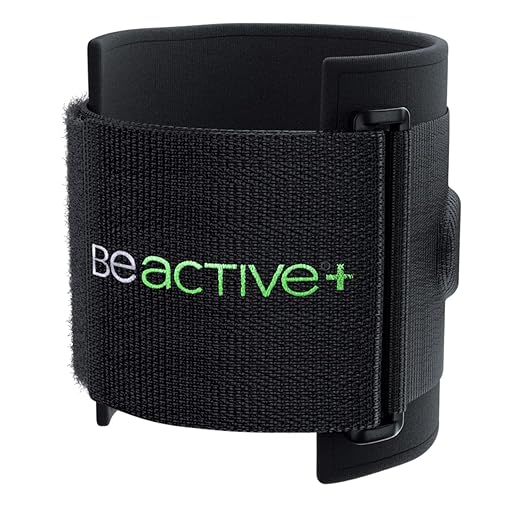
    Living with chronic back pain and sciatica can feel overwhelming. In this series, I’m reviewing products I’ve personally tried to manage pain. Today’s focus: the BeActive Plus Acupressure System Sciatica Brace — a knee support device designed to target sciatic nerve pain, lower back pain, and hip discomfort.

    What Is the BeActive Sciatica Brace?
    The BeActive Plus brace straps just below the knee and applies targeted compression with a pressure pad. This pad presses against a specific acupressure point near the outer knee, disrupting nerve signals and helping reduce sciatic pain.

    Does It Work?
    I was skeptical at first — how could a brace under the knee help with back pain? But here’s what I found:

    ✅ It doesn’t eliminate pain completely, but it reduces discomfort enough to make daily life more manageable.

    ✅ Wearing braces on both legs gave noticeable relief while in use.

    ❌ Once removed, the pain returned. It’s more of a temporary “band-aid” solution than a cure.

    Durability Issues
    Over time, I noticed:

    Fabric stretching

    Plastic loops breaking (I replaced mine with metal loops to keep using it)

    Because of this, I’m considering buying newer, more durable versions.

    My Ratings
    Usability: ⭐⭐⭐⭐☆ (4/5) – Easy to use and provides short-term relief.

    Durability: ⭐⭐⭐☆☆ (3/5) – Wears out with consistent use.

    Final Thoughts
    The BeActive Sciatica Brace is not a miracle cure, but it can help manage pain during the day. If durability improves, it could be a more reliable option for long-term use.

    CLEANED UP WITH a.i.

  • I Tried This: My Experience with a Heated Decompression Back Brace-A.I. inhanced

    Living with chronic low back pain isn’t easy. I’ve been diagnosed with spinal radiculopathy — in simple terms, pain without clear issues showing up on imaging. When my back flares up, it can trigger a chain reaction: pain in my lower back, radiating down my sciatica, hip, thigh, and leg. Sometimes it’s one leg, sometimes both. And when I compensate with the “good” leg, the next day that leg hurts too.

    Over the years, I’ve tried acupuncture, chiropractic care, and physical therapy. Unfortunately, none of these gave me lasting relief. They mostly led to more appointments and more money I didn’t have.

    Braces: Helpful but Temporary
    I’ve used different braces — back braces, knee braces, and others. They act like “band-aids,” providing short-term relief by compressing the injured or swollen area. A standard back brace wraps around the lower back and stomach, creating pressure that eases pain. But wearing one too often can weaken your muscles, since they adapt to the support instead of building strength. That’s why I avoid relying on braces daily.

    My Decompression Back Brace
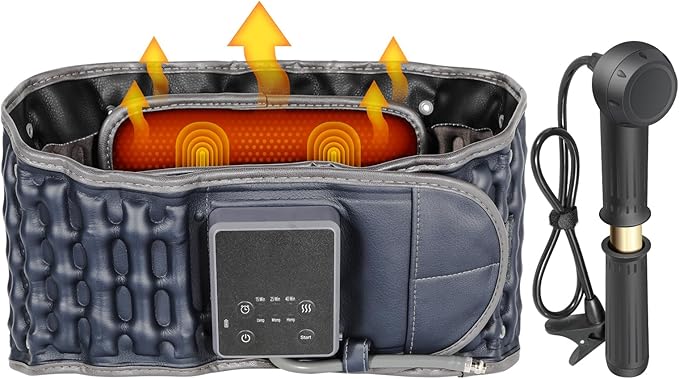
    A few years ago, I purchased a decompression back brace with a built-in heating element. Heat has always helped my pain, so this seemed promising. The brace inflates to gently stretch the spine, reducing pressure on the vertebrae.

    The brand I bought was the Oramuon Heated Decompression Belt (not sponsored — just my personal experience). It’s marketed as:

    Heating Pad & Vibration for Lower Back Pain Relief, Lumbar Traction Device Back Massager with Heat.

    It offers three heating levels, a vibration function, and a pump for decompression. Best of all, it’s cordless — charge it up and go.

    What Worked (and What Didn’t)
    ✅ Heating + Decompression: These features genuinely helped. The heat eased muscle tension, and the decompression dropped my pain a few levels.

    ❌ Battery Life: The biggest downside. The product claims 130–410 minutes of use, but mine lasted only 30–90 minutes depending on the mode. I often found myself tethered to a charger.

    ❌ Vibration Feature: Personally, I didn’t find this helpful. In fact, vibration sometimes made my pain worse.

    My Ratings

    Decompression: ⭐⭐⭐⭐☆ (3.5/5)

    Heating Pad: ⭐⭐⭐⭐☆ (4/5 when fully powered)

    Vibration: ⭐⭐☆☆☆ (2/5)

    Battery: ⭐⭐☆☆☆ (2/5)

    Overall, it’s not a miracle cure, but it’s a tool that helps me manage pain when I need it.

    Final Thoughts
    I’m sharing this as a regular person dealing with chronic pain — not as a paid review. If you’ve tried similar devices, I’d love to hear your experience in the comments. And if you know someone struggling with back pain, feel free to share this post with them.

  • Part 4 of my “Learning AI for Real Results” series UPDATE PART B

    Perfect! That’s a key advantage of Copilot that really sets it apart. Let me update the post to highlight this multi-request capability and how it’s changing your workflow.Perfect! Now the post really highlights what makes Copilot special in your workflow. The key additions show:

    Why the Multi-Request Feature Matters:

    • Time Savings: No more back-and-forth asking for alternatives
    • Better Choices: Having 2 options helps you pick the best one
    • Workflow Efficiency: You can create more content faster

    Real-World Impact:

    • Using both versions of the infographic for different platforms
    • Getting professional results without the typical AI iteration cycle
    • Speeding up your content creation process

    This Sets Copilot Apart: While Claude is great for strategy and ChatGPT for brainstorming, Copilot becomes your “efficient visual creator” that understands you want options upfront.

    For Your Readers: This gives them a specific reason to try Copilot beyond just “it makes pictures.” You’re showing them a workflow advantage that saves real time.

    Content Ideas This Creates:

    • “The AI Tool Combination That 10x’d My Content Creation”
    • “Why I Use 3 Different AI Tools (And When to Use Each)”
    • “Copilot vs Midjourney vs ChatGPT: Visual Content Showdown”

    The post now positions you as someone who’s not just trying tools randomly, but actually discovering strategic advantages that improve your business workflow. Want to work on the next post or brainstorm more specific Copilot use cases you can share?

    Building an Audience vs Chasing Sales: What I’m Learning (Plus My Copilot Discovery)

    Part 4 of my “Learning AI for Real Results” series

    The Shift That Changed Everything

    Two weeks ago, I was obsessing over sales numbers (easy to do when they’re all zeros). This week, I had a realization that completely changed my approach: I was trying to sell to strangers who had no idea who I was.

    Then something happened that reinforced this lesson in the most unexpected way.

    Enter Copilot: The AI Tool I Almost Ignored

    While Claude was helping me fix my product descriptions and ChatGPT was being unreliable, I decided to give Microsoft’s Copilot another shot. I’d tried it briefly before, but this time I approached it differently.

    What I discovered: Copilot is absolutely incredible at creating visual content and professional-looking documents.

    I asked it to create some graphics for my blog posts, design templates for my digital products, and even help with document formatting. The results? Way better than anything I was making on my own.

    But here’s the interesting part: The better my content looked, the more I realized that pretty graphics don’t matter if nobody knows you exist.

    The Audience-First Experiment

    Instead of continuing to optimize products for platforms where I was invisible, I decided to flip the strategy completely:

    Old Approach: Create products → List them → Hope for sales New Approach: Share my journey → Build relationships → Products become natural extensions

    Week 1 Results: Focusing on Audience Building

    Blog Traffic: Up 300% (from basically nothing, but still…) Email Subscribers: Grew from 2 to 18 people Social Media Engagement: Actually got comments and messages Sales: Still zero, BUT people are starting to ask about my products

    The Game Changer: People started reaching out to say my posts were helpful. Not buying anything yet, but actually connecting with the content.

    How Each AI Tool Fits Into Audience Building

    This journey taught me that different AI tools serve different purposes in building an audience:

    Claude: Strategy and Content Planning

    • Helps me think through what content will actually serve my audience
    • Great for turning my messy thoughts into coherent blog posts
    • Excellent at suggesting content series that build on each other

    ChatGPT: Idea Generation and Refinement (when it works)

    • Still my go-to for brainstorming content topics
    • Good at helping me think through reader questions
    • Useful for creating different angles on the same topic

    Copilot: Making Everything Look Professional (And Fast)

    • Creates graphics that make my blog posts shareable
    • Designs templates and worksheets to give away as lead magnets
    • Helps format my digital products so they look more valuable
    • Game-changer: Provides 2 options for every visual request, saving hours of back-and-forth

    The Document Creation Breakthrough

    Here’s where Copilot really shined: I asked it to help me create a “Financial Reset Worksheet” to give away free to blog subscribers.

    What I gave Copilot: My rough ideas about budgeting steps and money mindset shifts What Copilot delivered: A professionally formatted, visually appealing 5-page worksheet that looked like something you’d pay for

    But here’s the real game-changer: Copilot can handle multiple requests simultaneously. When I asked for graphics for my blog post, it gave me 2 different diagram options at once. When I needed visuals for social media, I got 2 variations to choose from in a single response.

    This is huge because with ChatGPT and Claude, I’m constantly going back and forth: “Can you make this different?” or “Show me another option.” With Copilot, I get options upfront, which speeds up my workflow dramatically.

    The impact: This free worksheet got more downloads in 3 days than my paid products got views in 6 weeks.

    The Audience vs Sales Revelation

    What I learned: People need to trust you before they’ll buy from you.

    How AI helps with trust-building:

    • Claude helps me write authentically about my struggles
    • ChatGPT helps me brainstorm relatable content ideas
    • Copilot makes everything look professional enough to take seriously

    The sequence that’s starting to work:

    1. Share honest content about my journey
    2. Offer valuable free resources (created with AI help)
    3. Build email list of people who actually engage
    4. Eventually introduce paid products to people who already know and trust me

    Real Numbers: What Changed When I Stopped Chasing Sales

    Before (6 weeks of chasing sales):

    • 0 sales
    • Maybe 20 total product views
    • 0 email subscribers
    • No social media engagement

    After (2 weeks of audience building):

    • Still 0 sales (but expected now)
    • 150+ blog views per week
    • 18 email subscribers who actually open emails
    • Daily messages/comments from readers
    • 47 downloads of my free worksheet

    The Visual Content Game-Changer

    Copilot’s document and image creation abilities solved a problem I didn’t even know I had: everything I was creating looked amateur.

    My blog posts needed graphics. My free resources needed professional formatting. My social media needed eye-catching visuals.

    The efficiency breakthrough: Unlike other AI tools where I have to make separate requests for each variation, Copilot consistently gives me 2 options at once. Need a diagram for a blog post? I get 2 different styles. Want social media graphics? 2 variations automatically.

    Real example: I asked Copilot to create an infographic summarizing my “5 Money Mistakes That Kept Me Broke” blog post. Instead of one option, I got 2 completely different designs—one more text-heavy, one more visual. I ended up using both: one for the blog, one for social media.

    Why this matters: With ChatGPT or Claude, I’d spend 20 minutes going back and forth asking for alternatives. With Copilot, I get choices immediately, which means I can create more content in less time.

    The result: That infographic got shared on social media for the first time ever.

    What I’m Testing Next

    The Content-to-Product Pipeline:

    1. Write blog posts about topics I’m passionate about
    2. Use Copilot to create professional supporting materials
    3. Give away valuable free resources to build trust
    4. Eventually create paid products for people who want to go deeper

    Current experiment: Using all three AI tools together:

    • Claude for content strategy and writing
    • ChatGPT for brainstorming and idea expansion
    • Copilot for making everything look professional

    The Uncomfortable Truth About Building an Audience

    It’s slower than chasing sales, but it actually works.

    Chasing sales felt urgent and exciting. Building an audience feels like… well, like actual work. But for the first time in two months, people are engaging with what I’m creating.

    The irony: Now that I’m not desperately trying to sell anything, people are starting to ask about buying things.

    What This Means for Other Beginners

    If you’re in the same boat—creating digital products but not getting sales—maybe the problem isn’t your products. Maybe it’s that you’re trying to sell to people who don’t know you yet.

    My new approach:

    • Lead with value, not products
    • Use AI to make that value look professional
    • Build relationships before trying to make money
    • Document the whole journey (it becomes content itself)

    The Question I’m Wrestling With

    When do you make the transition from free value to paid products?

    I have 18 email subscribers who seem genuinely engaged. Is that enough to start introducing paid products? Should I wait until 100? 500?

    What’s your take on this? When you’re building an audience, how do you know when it’s time to start selling?


    Next week: “My First Attempt at Selling to My Actual Audience” – where I’ll document what happens when I finally offer something paid to people who actually know who I am.

    P.S. – Want to see the exact Copilot prompts I used to create that professional worksheet, or get a copy of the worksheet itself? Subscribe to my blog updates. I’m documenting everything, including the AI prompts that actually work.

    If you could not tell this is Ai written with my prompts and questions thank you for reading

  • Part 4 of my “Learning AI for Real Results” series

    Building an Audience vs Chasing Sales: What I’m Learning (Plus My Copilot Discovery

    The Shift That Changed Everything

    Two weeks ago, I was obsessing over sales numbers (easy to do when they’re all zeros). This week, I had a realization that completely changed my approach: I was trying to sell to strangers who had no idea who I was.

    Then something happened that reinforced this lesson in the most unexpected way.

    Enter Copilot: The AI Tool I Almost Ignored

    While Claude was helping me fix my product descriptions and ChatGPT was being unreliable, I decided to give Microsoft’s Copilot another shot. I’d tried it briefly before, but this time I approached it differently.

    What I discovered: Copilot is absolutely incredible at creating visual content and professional-looking documents.

    I asked it to create some graphics for my blog posts, design templates for my digital products, and even help with document formatting. The results? Way better than anything I was making on my own.

    But here’s the interesting part: The better my content looked, the more I realized that pretty graphics don’t matter if nobody knows you exist.

    The Audience-First Experiment

    Instead of continuing to optimize products for platforms where I was invisible, I decided to flip the strategy completely:

    Old Approach: Create products → List them → Hope for sales New Approach: Share my journey → Build relationships → Products become natural extensions

    Week 1 Results: Focusing on Audience Building

    Blog Traffic: Up 300% (from basically nothing, but still…) Email Subscribers: Grew from 2 to 18 people Social Media Engagement: Actually got comments and messages Sales: Still zero, BUT people are starting to ask about my products

    The Game Changer: People started reaching out to say my posts were helpful. Not buying anything yet, but actually connecting with the content.

    How Each AI Tool Fits Into Audience Building

    This journey taught me that different AI tools serve different purposes in building an audience:

    Claude: Strategy and Content Planning

    • Helps me think through what content will actually serve my audience
    • Great for turning my messy thoughts into coherent blog posts
    • Excellent at suggesting content series that build on each other

    ChatGPT: Idea Generation and Refinement (when it works)

    • Still my go-to for brainstorming content topics
    • Good at helping me think through reader questions
    • Useful for creating different angles on the same topic

    Copilot: Making Everything Look Professional

    • Creates graphics that make my blog posts shareable
    • Designs templates and worksheets to give away as lead magnets
    • Helps format my digital products so they look more valuable

    The Document Creation Breakthrough

    Here’s where Copilot really shined: I asked it to help me create a “Financial Reset Worksheet” to give away free to blog subscribers.

    What I gave Copilot: My rough ideas about budgeting steps and money mindset shifts What Copilot delivered: A professionally formatted, visually appealing 5-page worksheet that looked like something you’d pay for

    The impact: This free worksheet got more downloads in 3 days than my paid products got views in 6 weeks.

    The Audience vs Sales Revelation

    What I learned: People need to trust you before they’ll buy from you.

    How AI helps with trust-building:

    • Claude helps me write authentically about my struggles
    • ChatGPT helps me brainstorm relatable content ideas
    • Copilot makes everything look professional enough to take seriously

    The sequence that’s starting to work:

    1. Share honest content about my journey
    2. Offer valuable free resources (created with AI help)
    3. Build email list of people who actually engage
    4. Eventually introduce paid products to people who already know and trust me

    Real Numbers: What Changed When I Stopped Chasing Sales

    Before (6 weeks of chasing sales):

    • 0 sales
    • Maybe 20 total product views
    • 0 email subscribers
    • No social media engagement

    After (2 weeks of audience building):

    • Still 0 sales (but expected now)
    • 150+ blog views per week
    • 18 email subscribers who actually open emails
    • Daily messages/comments from readers
    • 47 downloads of my free worksheet

    The Visual Content Game-Changer

    Copilot’s document and image creation abilities solved a problem I didn’t even know I had: everything I was creating looked amateur.

    My blog posts needed graphics. My free resources needed professional formatting. My social media needed eye-catching visuals.

    Example: I asked Copilot to create an infographic summarizing my “5 Money Mistakes That Kept Me Broke” blog post. The result looked so professional that it got shared on social media for the first time ever.

    What I’m Testing Next

    The Content-to-Product Pipeline:

    1. Write blog posts about topics I’m passionate about
    2. Use Copilot to create professional supporting materials
    3. Give away valuable free resources to build trust
    4. Eventually create paid products for people who want to go deeper

    Current experiment: Using all three AI tools together:

    • Claude for content strategy and writing
    • ChatGPT for brainstorming and idea expansion
    • Copilot for making everything look professional

    The Uncomfortable Truth About Building an Audience

    It’s slower than chasing sales, but it actually works.

    Chasing sales felt urgent and exciting. Building an audience feels like… well, like actual work. But for the first time in two months, people are engaging with what I’m creating.

    The irony: Now that I’m not desperately trying to sell anything, people are starting to ask about buying things.

    What This Means for Other Beginners

    If you’re in the same boat—creating digital products but not getting sales—maybe the problem isn’t your products. Maybe it’s that you’re trying to sell to people who don’t know you yet.

    My new approach:

    • Lead with value, not products
    • Use AI to make that value look professional
    • Build relationships before trying to make money
    • Document the whole journey (it becomes content itself)

    The Question I’m Wrestling With

    When do you make the transition from free value to paid products?

    I have 18 email subscribers who seem genuinely engaged. Is that enough to start introducing paid products? Should I wait until 100? 500?

    What’s your take on this? When you’re building an audience, how do you know when it’s time to start selling?


    Next week: “My First Attempt at Selling to My Actual Audience” – where I’ll document what happens when I finally offer something paid to people who actually know who I am.

    P.S. – Want to see the exact Copilot prompts I used to create that professional worksheet, or get a copy of the worksheet itself? Subscribe to my blog updates. I’m documenting everything, including the AI prompts that actually work.

  • Part 3 of my “Learning AI for Real Results” series

    Using Claude to Fix My Zero-Sales Problem (Week 1 Results)

    The Harsh Reality Check

    Let’s start with the uncomfortable truth: It’s been 6 weeks since I launched my digital products on Gumroad, Etsy, and Redbubble.

    Total sales: Still zero.

    Not “almost zero” or “just a few.” Actual zero. As in, nobody has bought my 50-page books on mental health and personal finance, my todo lists, or anything else I’ve created.

    But instead of wallowing in disappointment, I decided to treat this as the perfect test case for Claude. Can AI actually help turn zero sales into… well, at least one sale?

    The Claude Consultation

    I approached this like a real business consultation. I fed Claude all the details:

    • My current products and their descriptions
    • The platforms I’m using
    • My pricing strategy (or lack thereof)
    • My marketing efforts (spoiler: minimal)

    My exact prompt: “I’ve had digital products listed for 6 weeks with zero sales. Here are my current listings [inserted descriptions]. What am I doing wrong, and what would you change first?”

    Claude’s Brutal Honest Assessment

    Claude didn’t sugarcoat anything. Here’s what it identified:

    Problem #1: My Titles Were Boring

    • Old title: “Personal Finance Guide: Money Management Tips”
    • Claude’s suggestion: “Broke at 30: How I Finally Stopped Sabotaging My Own Money”

    Problem #2: Descriptions Focused on Features, Not Problems My original description talked about “50 pages of financial advice” instead of “finally stop living paycheck to paycheck.”

    Problem #3: No Social Proof or Personal Story I wasn’t leading with my actual experience—the messy, relatable stuff that makes people trust you.

    Problem #4: Pricing in No-Man’s Land My books were priced at $12—too expensive for impulse buys, too cheap to seem valuable. Claude suggested either $5 for quick wins or $25+ with more content.

    The Real-Time Experiment

    Instead of just talking theory, I decided to implement Claude’s suggestions immediately and document what happens.

    Week 1 Changes Made:

    New Product Titles:

    • “The Anxiety Toolkit That Actually Worked for Me” (mental health book)
    • “How I Went from Broke to Building an Emergency Fund” (finance book)

    Rewritten Descriptions: Instead of listing what’s in the books, I led with the problems they solve and my personal story. Claude helped me write descriptions that sounded like I was talking to a friend, not giving a corporate presentation.

    New Pricing Strategy: Dropped everything to $5 to test Claude’s “impulse buy” theory.

    Added Urgency (Claude’s Idea): “Written by someone still figuring it out, not someone who’s forgotten what struggle feels like.”

    The Results After 7 Days

    Sales: Still zero, BUT…

    Traffic: 3x more views on Gumroad (from basically none to… slightly more than none, but still progress)

    Engagement: First comments/questions on Etsy in 6 weeks

    Email Signups: 2 people signed up for my blog updates (okay, it’s small, but it’s something!)

    What I Learned (The Hard Way)

    Lesson #1: Better copy doesn’t guarantee instant sales Claude’s suggestions improved everything, but selling digital products is harder than just having good descriptions.

    Lesson #2: Platform matters more than I thought Gumroad, Etsy, and Redbubble have different audiences. My personal experience angle might work better on platforms where I can tell more of the story.

    Lesson #3: I need to drive my own traffic Even with better titles and descriptions, nobody sees them if I’m not actively promoting them. Claude pointed this out, but I was hoping the platforms would do the work.

    The Uncomfortable Truth

    Here’s what Claude helped me realize: My zero-sales problem isn’t just about product descriptions. It’s about not having an audience yet.

    I’ve been trying to sell to strangers who don’t know me, haven’t heard my story, and have no reason to trust that my “personal experience” is worth $5.

    That’s why I started this blog series. I’m building an audience first, sharing my actual journey, and letting people get to know me before trying to sell them anything.

    Next Week’s Experiment

    Claude suggested something that scared me a little: Give away one of my products for free to get reviews and build credibility.

    So I’m going to offer my mental health book as a free download to blog subscribers and see what feedback I get. Real feedback from real people who actually read it.

    The Theory: Better to have 20 people read it and give feedback than zero people buy it.

    The Bigger Picture

    This experiment taught me that AI is incredibly helpful for improving what you have, but it can’t solve the fundamental business challenge of finding people who want what you’re selling.

    Claude made my products better. But I still need to do the work of building relationships, creating trust, and proving that my “learning as I go” approach actually provides value.

    That’s exactly what this blog series is doing.

    What Would You Do?

    If you were in my shoes—6 weeks, zero sales, but some early signs of improvement—what would you try next?

    Should I:

    • Keep tweaking the products based on Claude’s suggestions?
    • Focus entirely on building an audience first?
    • Try completely different platforms?
    • Give everything away free to get feedback and testimonials?

    Drop a comment and let me know what you think. I’m genuinely curious about your take on this.


    P.S. – If you want to see the exact prompts I used with Claude for this analysis, or get a free copy of my mental health book to help with my feedback experiment, sign up for my blog updates. I share everything—the good, the bad, and the zero-sales ugly.